Master Reseller settings: Difference between revisions
Jump to navigation
Jump to search
Astropoint (talk | contribs) mNo edit summary |
Astropoint (talk | contribs) No edit summary |
||
| Line 8: | Line 8: | ||
* Resellers created 'under' master resellers need to have the owner of the account set to the master reseller. Otherwise it will not show up in the master reseller's list of accounts. | * Resellers created 'under' master resellers need to have the owner of the account set to the master reseller. Otherwise it will not show up in the master reseller's list of accounts. | ||
* The packages the master resellers use may need to have the feature list option set to 'Reseller' if they are creating reseller accounts | |||
Revision as of 20:31, 11 May 2016
For now a general page of notes relating to how the resellers stuff works
Permissions
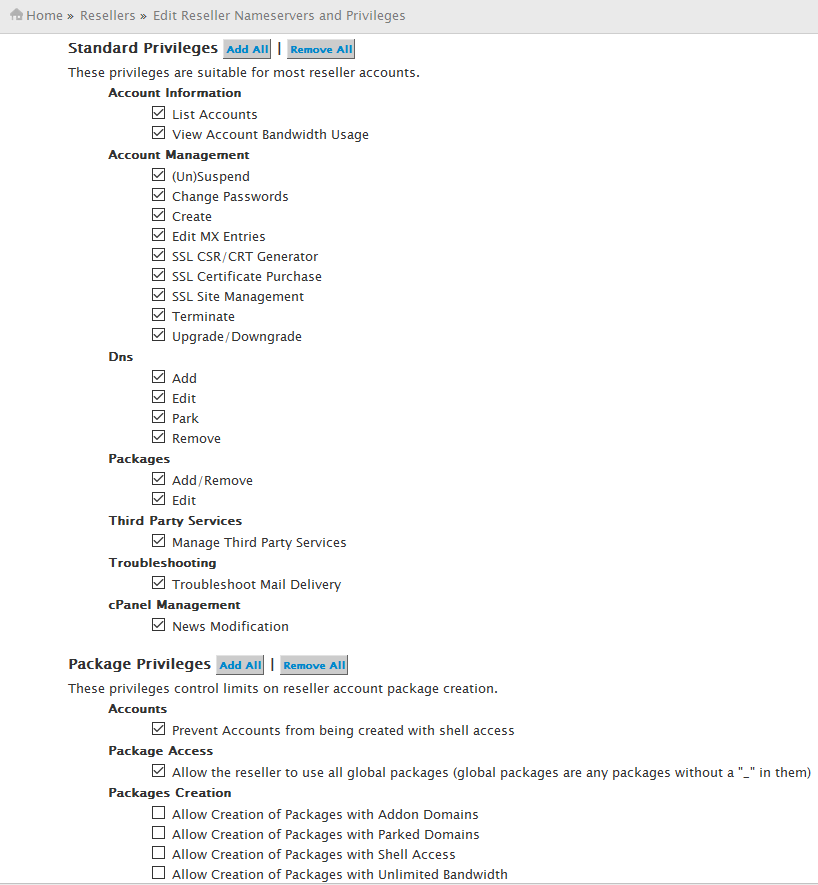
- Once set up the resellers need to be given reseller permissions in addition to being on a reseller package. These can be found in Resellers -> Reseller Center. Change the reseller in the 'Reseller Actions for' drop down and select 'Edit Reseller Nameservers and Privileges'. The standard reseller privileges are usually enough, http://thefsm.no-ip.org/~james/gigatux/resellerprivs.png
Master Reseller
- Resellers created 'under' master resellers need to have the owner of the account set to the master reseller. Otherwise it will not show up in the master reseller's list of accounts.
- The packages the master resellers use may need to have the feature list option set to 'Reseller' if they are creating reseller accounts